Posts

Showing posts with the label Intel HD Graphics

Is Intel HD Graphics Good for Gaming

Intel HD Graphics is getting better with each new generation, but games' graphics is getting better and more demanding with each new generation, too, so has Intel HD Graphics managed to catch up and become good enough for gaming? If that's what you are wondering, read on and you will find the answer.

Intel HD Graphics Performance Comparison

Each new generation of Intel HD Graphics brings some performance improvements and new features to the table, but have you ever wondered what exactly are these new features and how much faster is the latest Intel HD Graphics in respect to its older siblings. If yes, then read on, as this article answers to both of these questions.

Intel HD and Arc Graphics - Nvidia and AMD Equivalents

Intel's integrated graphics are getting better with each generation, but they still offer performance at the level of low end dedicated video cards from Nvidia and AMD. If you wonder which Nvidia or AMD video card your Intel graphics is equivalent to in order to make the proper choice for upgrade or simply out of curiosity, then you have come to the right place. In this article I'm going to show you which dedicated video cards offer the same performance as the different generations of Intel HD Graphics.

Games Playable on Intel HD Graphics

Intel improves the graphics integrated in their processors with each generation and the result is that many games are now playable with Intel HD Graphics. The important questions you might ask are "Which games can be played with my Intel HD Graphics" and "How well will they run on it?". If that is what you wonder, then you have come to the right place, because this article answers both of these questions by providing a table of many popular games and the graphics quality settings that each generation of Intel HD Graphics can handle for each of the games.

How to Upgrade Intel HD Graphics in a Laptop

Image
Intel's integrated graphics become better with each generation but they still compete only with the entry level dedicated video cards. That's why many users at some point begin to look for more performance. If the tips to improve Intel HD Graphics performance do not provide enough graphics boost for you, you should consider upgrading your Intel HD Graphics. Desktop users can do this pretty easy - they simply need to get a mid-range dedicated video card, insert it in a PCI Express x16 slot and voila, they will be able to enjoy games at their fullest. Unfortunately, if you are on a laptop or an All-in-One PC, then this most probably is not an option. Not everything is lost, however, continue reading this article and at the end you will know what are the options for upgrading your laptop's Intel HD Graphics, so that you can decide what's the best option for you.

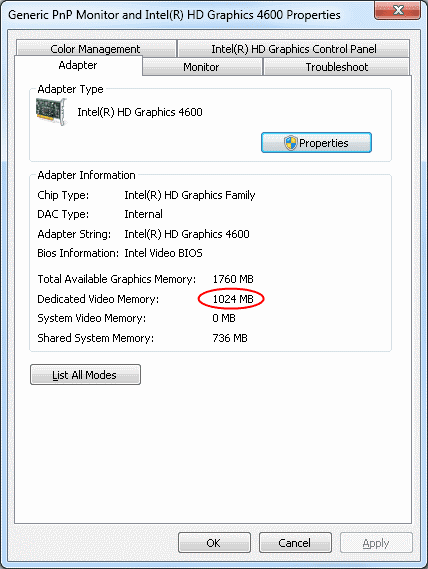
How to Increase Intel HD Graphics Dedicated Video Memory

Image
Intel HD Graphics is an integrated video solution and as such it is not very fast, because it has no memory of its own, but takes some from system RAM. Nevertheless, Intel HD Graphics has come a long way and recently it made the budget video cards practically obsolete letting its owners play even the newest games at low settings. Unfortunately, some games are coded to require a specific amount of dedicated video memory and if not present in the system they refuse to start, although they may be perfectly playable on Intel HD Graphics. In this article I'm going to discuss this exact problem and I will show you how to increase the "dedicated" video memory of Intel HD Graphics or whenever not possible what to do in order to make these games run on your computer.

Skyrim on Intel HD Graphics

Image
The Elder Scrolls V: Skyrim is the long waited sequel of The Elder Scrolls IV Oblivion. Just like its predecessor, the game features impressive graphics, so you may wonder whether it's going to run on Intel HD Graphics. Well, wonder no more, as I can confirm that the game runs fine as long as you play on a reasonable resolution and settings. Read on to find out which settings will let you enjoy a smooth Skyrim gameplay on Intel HD Graphics.

Intel HD Graphics - FAQ

Image
Intel HD Graphics is one of the most commonly used graphics processing units (GPU) today. Millions of desktops, laptops, ultrabooks and tablets rely on it for graphics processing tasks, so if you are not a hardcore gamer, chances are that you own a device equipped with it. Intel HD Graphics is integrated into the processor, which provides much greater performance than previous generations of integrated GPUs. What's common with the previous generations of integrated graphics is that Intel HD Graphics does not have a memory of its own but rather dynamically takes memory from system's RAM to use for graphics needs. This behavior usually raises some questions in Intel HD Graphics owners and that's exactly what this article deals with - it gives the answers to the most frequently asked questions about Intel HD Graphics.

Diablo 3 on Intel HD Graphics

Image
Diablo 2 was one of the most successful games of all time. Gamers had to wait 12 years for its successor but finally Diablo 3 is here and the waiting was well worth it. The question is - is your computer powerful enough to deal with the hordes of hell once again? Chances are that it is, even if you have a weak video card. Yes that's right, even people with the recent generations of integrated graphics cards such as the Intel HD Graphics and the AMD integrated Radeon graphics will be able to play this popular game perfectly fine as long as they play a bit with the game settings first. What, you say it would be better to play the game, instead of playing with the settings? Well, I agree and that is why I have created this article - it explains what each of the Diablo 3 video settings means and recommends you the optimal settings for Intel HD Graphics, so that you can enjoy playing Diablo 3 without any lag or overheating issues.

4 Ways to Improve Intel HD Graphics Performance

Image
Not a long time ago integrated graphics card was a synonym of low performance, non-game capable video card. Fortunately, huge advancements has been made and today an integrated graphics card can satisfy all of our multimedia and gaming needs (except those of the hardcore gamers, of course). So if you are not a hardcore gamer or a professional video editor, chances are that you have a desktop computer or a laptop with an integrated video card. In this article I'm going to show you how to get the max out of the integrated graphics card in Intel processors - Intel HD Graphics. The performance improvement tips in this article will also work for other integrated graphics cards, for example the AMD integrated graphics.